
Task: QTUM Activation
API-v2task::enable_qtum::init
Use this method for task managed activation of QTUM coins and tokens. Refer to the task managed activation overview for activation of other coin types.
| Parameter* = required | Type | Description |
|---|---|---|
| activation_params* | object | An object containing the activation parameters below. A standard ActivationParams object. |
| activation_params.mode* | object | Activation mode configuration. A standard ActivationMode object. |
| ticker* | string | The ticker of the coin you want to enable. |
| Parameter* = required | Type | Description |
|---|---|---|
| task_id* | integer | An identifying number which is used to query task status. |
task::enable_qtum::init
POST
task::enable_qtum::init{
"method": "task::enable_qtum::init",
"mmrpc": "2.0",
"params": {
"activation_params": {
"gap_limit": 20,
"min_addresses_number": 3,
"mode": {
"rpc": "Electrum",
"rpc_data": {
"servers": [
{
"protocol": "SSL",
"url": "qtum.electrum1.cipig.net:20050"
},
{
"protocol": "SSL",
"url": "qtum.electrum2.cipig.net:20050"
},
{
"protocol": "SSL",
"url": "qtum.electrum3.cipig.net:20050"
}
]
}
},
"priv_key_policy": "ContextPrivKey",
"scan_policy": "scan_if_new_wallet"
},
"ticker": "QTUM"
},
"userpass": "RPC_UserP@SSW0RD"
}
Response (Success)
SUCCESS
{
  "id": null,
  "mmrpc": "2.0",
  "result": {
    "task_id": 1
  }
}
API-v2task::enable_qtum::status
After running the task::enable_qtum::init method, we can query the status of activation to check its progress.
The response will return the following:
- Result of the task (success or error)
- Progress status (what state the task is in)
- Required user action (what user should do before the task can continue)
| Parameter* = required | Type | Description |
|---|---|---|
| task_id* | integer | The identifying number returned when initiating the initialisation process. |
| forget_if_finished | booleandefault: `true` | Optional. If false, will return final response for completed tasks. |
task::enable_qtum::status
POST
task::enable_qtum::status{
"method": "task::enable_qtum::status",
"mmrpc": "2.0",
"params": {
"forget_if_finished": false,
"task_id": 0
},
"userpass": "RPC_UserP@SSW0RD"
}
The response formats for this method are the same as the task managed activation responses.
API-v2task::enable_qtum::user_action
If the task::enable_qtum::status returns UserActionRequired, we need to use the task::enable_qtum::user_action method to enter our PIN
| Parameter* = required | Type | Description |
|---|---|---|
| task_id* | integer | The identifying number returned when initiating the initialisation process. |
| user_action* | object | Object containing the params below |
| user_action.action_type* | string | Will be TrezorPin or TrezorPassphrase. |
| user_action.passphrase* | string | Your Trezor passphrase. This is the passphrase you use to unlock a hidden wallet on your Trezor device. Can be empty if you are using a non-hidden wallet. |
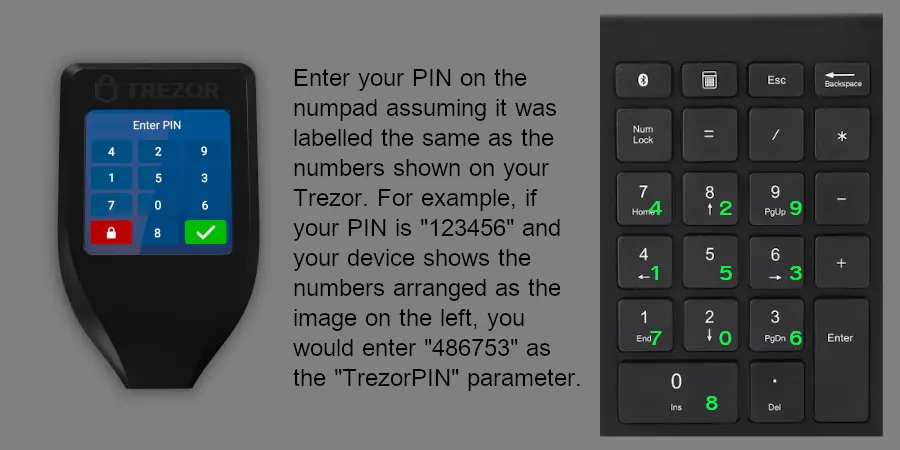
| user_action.pin* | string (number) | When the Trezor device is displaying a grid of numbers for PIN entry, this param will contain your Trezor pin, as mapped through your keyboard numpad. See the image below for more information. |
| Parameter* = required | Type | Description |
|---|---|---|
| result* | string | The outcome of the request. |
task::enable_qtum::user_action
POST
task::enable_qtum::user_action{
"method": "task::enable_qtum::user_action",
"mmrpc": "2.0",
"params": {
"task_id": 0,
"user_action": {
"action_type": "TrezorPin",
"pin": "862743"
}
},
"userpass": "RPC_UserP@SSW0RD"
}
Response (undefined)
SUCCESS
CoinCreationError: Returned when a coin is not supported.
{
  "mmrpc": "2.0",
  "result": {
    "status": "Error",
    "details": {
      "error": "Error on platform coin QTUM creation: Coin doesn't support Trezor hardware wallet. Please consider adding the 'trezor_coin' field to the coins config",
      "error_path": "lib.init_qtum_activation.utxo_coin_builder",
      "error_trace": "lib:103] init_qtum_activation:71] utxo_coin_builder:234]",
      "error_type": "CoinCreationError",
      "error_data": {
        "ticker": "QTUM",
        "error": "Coin doesn't support Trezor hardware wallet. Please consider adding the 'trezor_coin' field to the coins config"
      }
    }
  },
  "id": null
}
API-v2task::enable_qtum::cancel
If you want to cancel the enabling process before it has completed, you can use this method.
| Parameter* = required | Type | Description |
|---|---|---|
| task_id* | integer | The identifying number returned when initiating the enabling process. |
| Parameter* = required | Type | Description |
|---|---|---|
| error* | string | An error message to explain what went wrong. |
| error_data* | string | The input task ID which resulted in the error. |
| error_path* | string | An indicator of the class or function which reurned the error. |
| error_trace* | string | An indicator of where in the source code the error was thrown. |
| error_type* | string | An enumerated value for the returned error. |
| result* | string | Indicates task cancellation was succesful. |
task::enable_qtum::cancel
POST
task::enable_qtum::cancel{
"method": "task::enable_qtum::cancel",
"mmrpc": "2.0",
"params": {
"task_id": 3
},
"userpass": "RPC_UserP@SSW0RD"
}
Response (Success)
SUCCESS
{
  "id": 0,
  "mmrpc": "2.0",
  "result": "success"
}
Response (undefined)
ERROR
Response (undefined)
ERROR